Evals
Results and traces
See which models passed, which was quickest and cheapest, and read every step each one took.
The Evals list
Evals with the same task, starter code and check are shown together as one task, even when you ran them on different days or with different models. Open a task to see every model and attempt on it, and open an eval to see its page.
An eval's page
At the top are the task, the starter code and the check. Under them are four numbers:
- Check: how many runs passed, for example "2 of 3 passed".
- Quickest to pass and Cheapest to pass: only runs that passed count, so a model that was fast but wrong does not win.
- Spent on models: what the models cost in all, and the tokens used.
Under them is one row per run, with a model's attempts kept together.
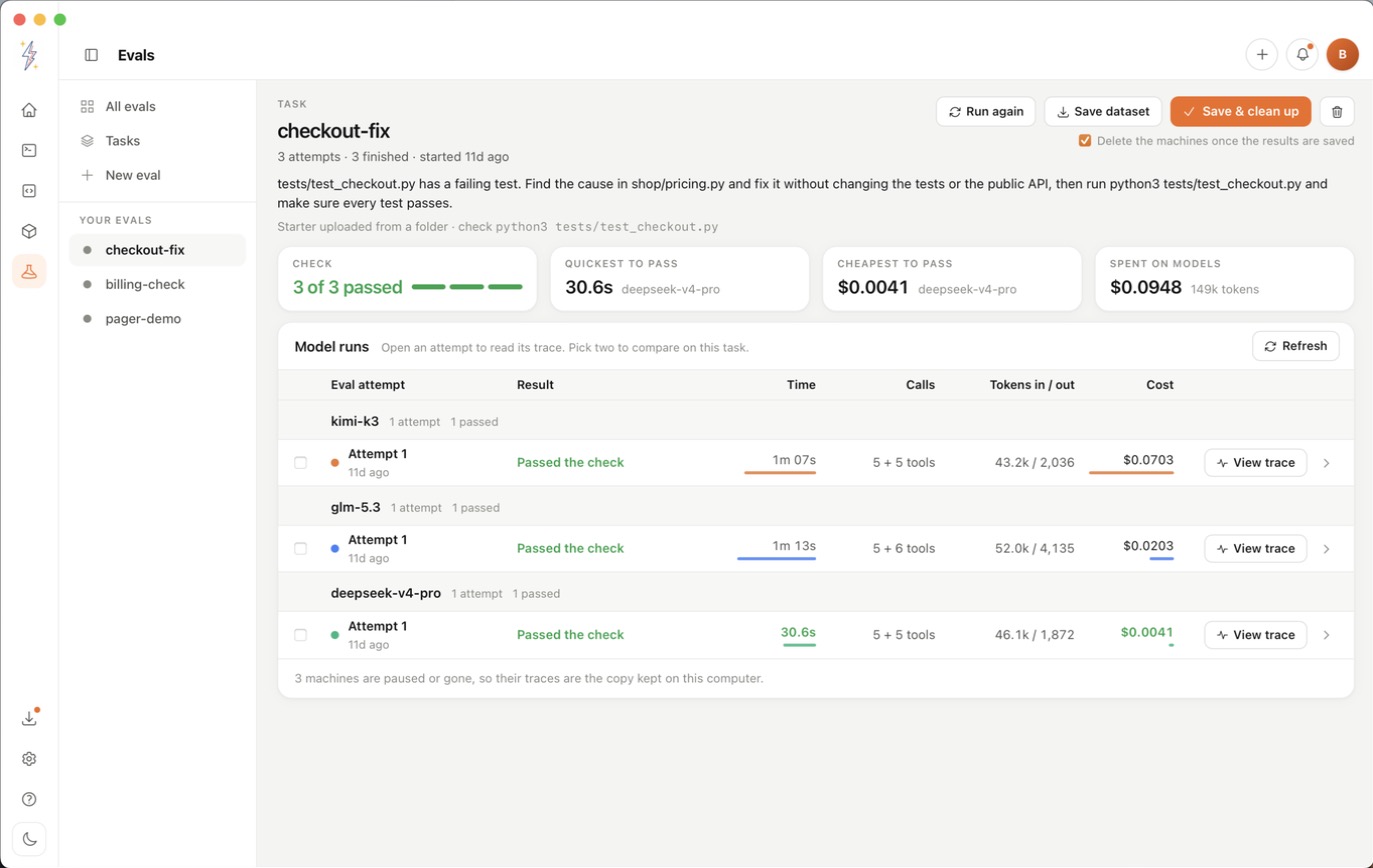
Model runs
Each run has a row with its result, time, model calls, tokens in and out, and cost. The result is one of:
- Working: the model is still on it.
- Passed: the check succeeded.
- Failed (exit N): the check failed with that exit code.
- Finished: the run is done and there was no check.
- Failed: the run itself broke. The line under it says why.
Hold the pointer on a result to see what the check printed. To see two runs next to each other, tick them and press Compare side by side.
Read a trace
Click a run's row to open its trace. The same steps can be shown four ways:
- Transcript: the run as a conversation. What the model was asked, what it thought and said, each command with its output, and each file edit as before and after.
- Timeline: every step as a bar on one time line, to see what was slow.
- Graph: the run as a map of model calls and the tools they used.
- Charts: where the time, tokens and money went, and the slowest steps.
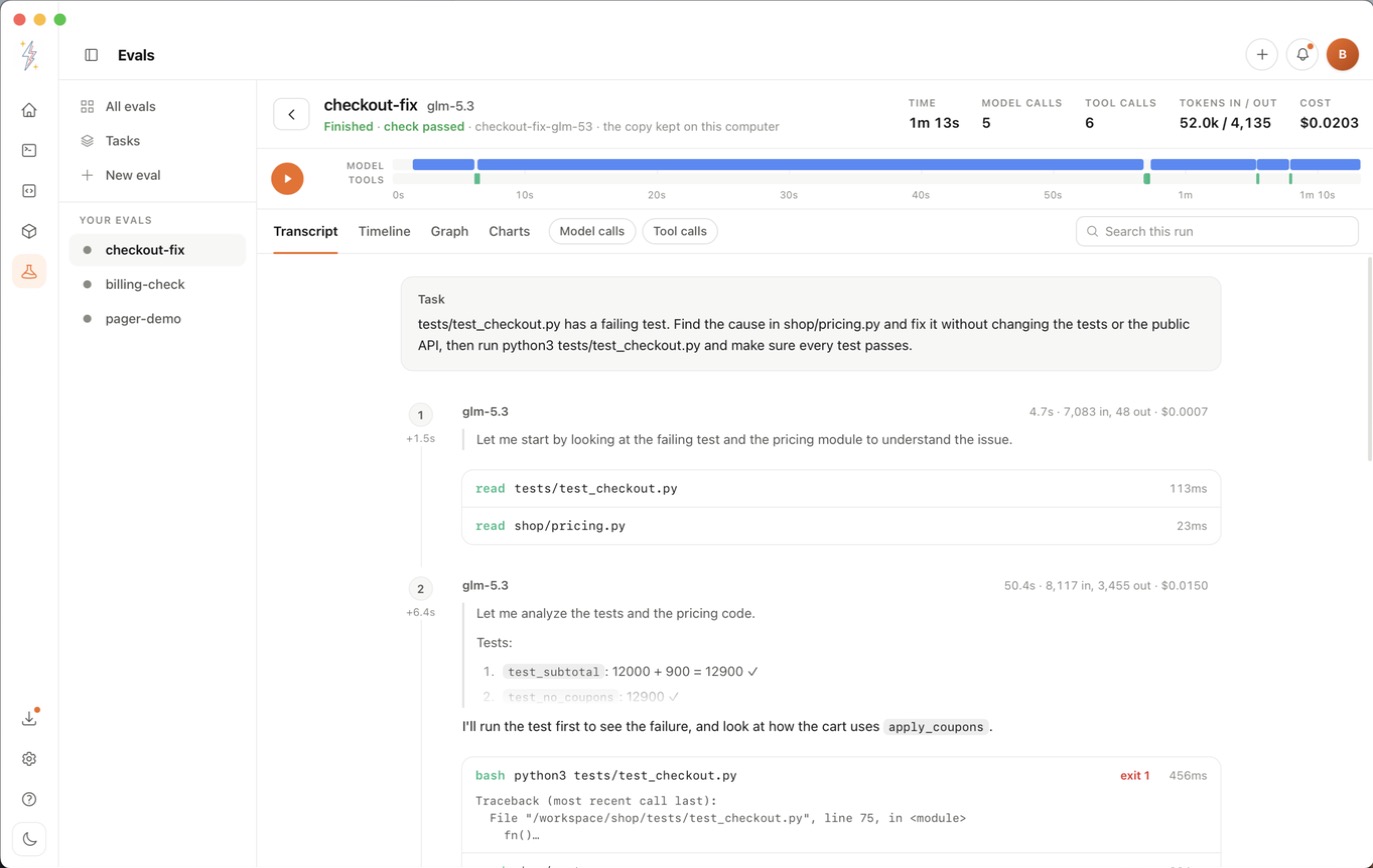
Around the views you can:
- Press play to watch the run again, step by step. This only replays it and costs nothing.
- Search everything the run recorded.
- Show only Model calls, Tool calls or Failures.
- If something went wrong, read the banner that says which step failed and why, and press Take me there.
- Click any step to see it in full. For a model call that includes its tokens, split into read, read from cache and written.
Ask a model call again
On a model call, press Ask this again. You can change any message or pick another BoltzLabs model, ask, and see the new answer next to the one from the run. Each ask is one model call, charged to your credits. No commands run and nothing on the machine changes.
Run it again
Press Run again to open New eval filled in with this eval's task, starter code, check and models. Change what you like and start it as a new eval. If the starter was a folder, choose the folder again.
Download your results
Download dataset on the website, or Save dataset in the desktop app, gives you one JSONL file with
each finished run: the conversation, the code changes and what the check printed. The app saves
it in BoltzLabs/evals in your home folder.
- The file can contain your code and anything the model saw, secrets included. Read it before you share it.
- It is read from the runs' machines, so download it before you delete the eval. If a machine has paused, that run is left out and the page says which one.
Clean up
- A run's machine pauses by itself after 30 minutes with nothing happening, which stops its hourly charge.
- Tick Delete machines after I confirm the download (on the website) or Delete the machines once the results are saved (in the app) to remove the machines once you have the file.
- Traces stay readable after the machines are gone: the website saves them to your account, and the desktop app keeps a copy on your Mac.
- Deleting an eval deletes its machines, everything on them and its saved traces, and stops any run still going. What the models were charged stays on your bill, and files you downloaded are not touched. This cannot be undone.
Want traces from an agent you wrote yourself? See the Python tracer.